Interactive browser
open_probo_browser is an MCP App: a tool whose
result is shown as an interactive UI inside the chat, in clients that support the MCP Apps extension
(such as Claude Desktop).
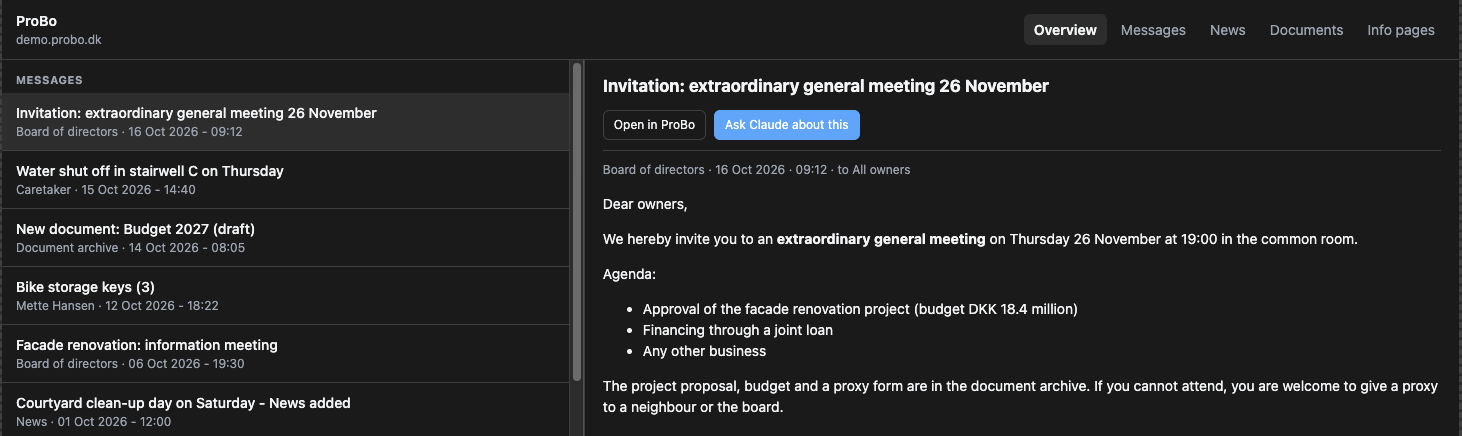
Ask "open the ProBo browser", or "show me the ProBo documents" to open the Documents tab directly.
What it does
- Tabs for the overview, messages, news, documents and info pages.
- Reading pane for full threads, news posts with comments, info pages, and the extracted text of documents.
- Folder navigation in the document archive, with breadcrumbs and a back button.
- Open in ProBo opens the item in your browser (through the host, which asks first).
- Ask Claude about this / Summarise with Claude sends a follow-up message into the chat, for example Summarise the ProBo document "Budget 2026.pdf" (document_id …).
- It follows the host's light/dark theme, colours and fonts.
Clients without MCP Apps support still get a useful result: the tool returns the same structured
overview as get_overview.
How it's built
The UI is one HTML file, src/probo_mcp/ui/browser.html, served as the resource
ui://probo/browser.html with MIME type text/html;profile=mcp-app. The tool links to it through
_meta.ui.resourceUri.
It talks to the host with the official MCP Apps SDK, @modelcontextprotocol/ext-apps. To avoid a
Node build step, the SDK's self-contained browser bundle is vendored
(src/probo_mcp/ui/vendor/, MIT-licensed) and inlined into the page when the resource is read. The
page then:
- connects to the host (
app.connect()) and applies the host context (theme, CSS variables, fonts); - receives the tool's result (
ontoolresult) and renders the overview; - calls server tools through the host when you click (
app.callServerTool({name: "get_message", ...})); - uses
app.openLink()andapp.sendMessage()for the action buttons.
Everything ProBo returns is treated as untrusted: the page escapes all content before rendering it,
and the small Markdown renderer only creates http(s) links.
To try it outside Claude, run the server over HTTP and open it in the ext-apps
basic-host
reference host. See Development.