probo-mcp
Ask Claude what's going on in your owners' association.
probo-mcp is a read-only Model Context Protocol server for EG ProBo, the portal Danish owners' associations (ejerforeninger), housing co-ops (andelsboligforeninger) and property administrators use to talk to residents.
Connect it to Claude Desktop, Claude Code or any MCP client, and ask things like:
- "What's new in ProBo this week?"
- "Summarise the documents for the general meeting and tell me what it costs me."
- "Find every document about the roof project."
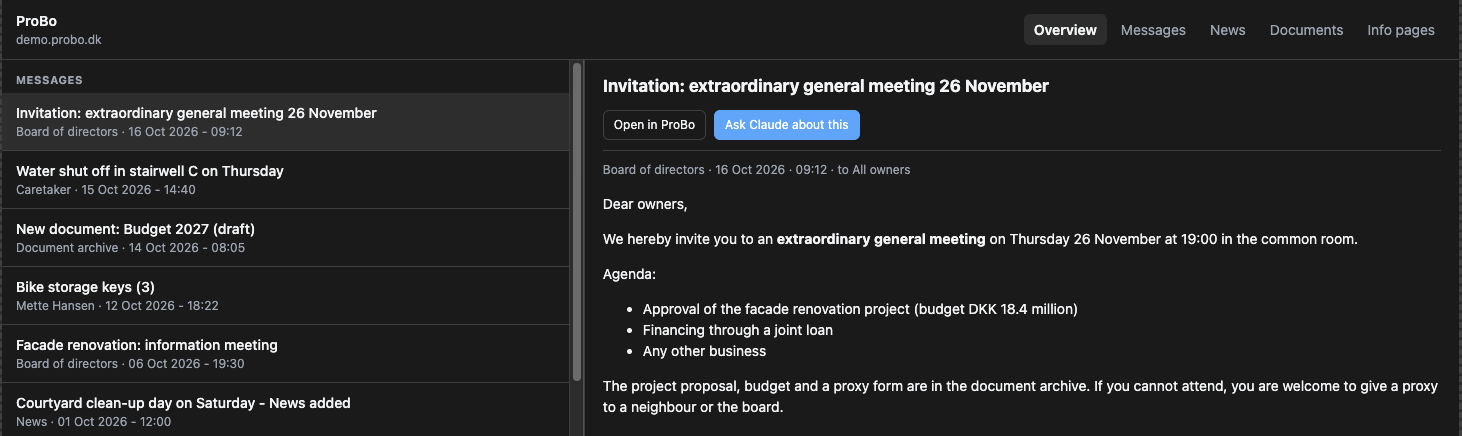
- "Show me the ProBo browser." an interactive browser opens in the chat.
-
One-click install for Claude Desktop
Download the
.mcpbextension, double-click it, and enter your ProBo address and login. -
Read-only by construction
The client can only fetch an allowlist of read-only routes, and the only thing it ever submits is the login form. It never sends messages, changes settings or deletes anything.
-
Documents, not just links
Walks the whole document archive with progress updates and extracts the text from PDFs, so Claude can read the meeting papers rather than just list them.
-
A tour of MCP 2.0
Structured output, resources with completion, prompts, progress, elicitation, an MCP App UI and cache hints, each tested on both protocol eras.
Unofficial
This project is not affiliated with or endorsed by EG A/S. It works by reading the same pages you see in your browser, so a ProBo redesign can temporarily break individual tools. ProBo has a "Forbundne apps" (connected apps) page, which suggests an official integration may be on its way.
Quick start
- Download
probo-mcp-<version>.mcpbfrom the latest release. - Double-click it (or drag it onto Claude Desktop) and click Install.
- Enter your ProBo address (
https://<association>.probo.dk), e-mail and password.
Passwords can be 1Password references (op://vault/item/password), so
the secret never has to sit in a config file.